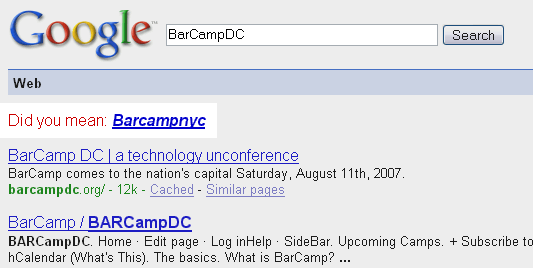
How does the Washington DC design community compare to, say, New York? Ouch.
Posted 26 August 2007 Tagged to Design, Washington DC
Heya. Welcome to the site of Darren Krape, a web designer and developer. When not building sites, I am hopefully travelling the world! More about me
You are currently browsing entries tagged to 'Design'.
Posted 26 August 2007 Tagged to Design, Washington DC
Posted 9 April 2007 Tagged to Design
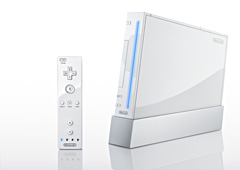
Although I have never been a big fan of console gaming, it has nonetheless been interesting to watch the latest crop of consoles come to market. What really struck me is, even though I never intend to buy any of consoles, I found myself hoping the Nintendo’s Wii would be the big winner. It is certainly not the most powerful, I’ve heard griping about the graphics and the better reviewed games are generally not in genres that interest me. Yet, despite this, I wanted the plucky little upstart to be win the day over the leviathan Sony and Microsoft’s entrants.
Why? Probably because it seems the most “human” of the three. I could easily imagine Nintendo developers actually having fun designing and testing the system. At Sony and Microsoft I could imagine, at best, nameless engineers spending long hours wringing one more frame per second out of the hardware - heat/power-consumption/cost/gameplay be damned.
For this reason, it was fascinating to read an extensive set of interviews with the system’s designers and developers, all on the Wii’s home page. It is an absorbing look into the creative process at one of the most clever companies out there.
There are a few interesting lessons I drew from the interviews:
What made the Wii successful was that it has a strong central concept around which the entire system is built, from the bits of hardware to the bytes of software. Most simply, the goal was accessibility: anyone should be able to use the Wii, regardless of age, experience, personal feelings toward gaming and so on. This drove the team to create intuitive interfaces, such as the remote controller, to underlying software that sought to include the entire family within the same shared space.
Nintendo sought from the very beginning to do something with the Wii. Yet they didn’t start out knowing exactly what that “different” thing would be. Initially they focused on very technical goals: lowering power consumption, heat, noise and the overall size of the console. Nonetheless, the end result was a stylish and easy-to-live-with white box that fits perfectly with Nintendo’s intended “humanization” of the console gaming experience. Merely shifting the rules of the game opened up vast new avenues for creativity, leading to something truly innovative that no one had expected.
This is what really separates Nintendo from their competitors. It has been a long time since a system really shifted the paradigm of console gaming. The Xbox 360 is really just an original Xbox, only more-so. The Playstation 3? Ultimately an upgraded Playstation 2, itself conceptually the same as the original Playstation 1.
As many out there advocate, focusing on simplicity can be a strong driver for creating successful products. This is certainly true with the Wii. While much attention was focused on delivering on proposed innovations, the developers also sought to strip out anything unnecessary.
[O]ur previous controllers, for the NES, SNES, N64 and GameCube, have evolved by adding features… With the Wii Remote however, we didn’t just add, but subtracted as well.
This is an important point, particularly for console system developers. As consoles become more and more complex, more like desktop computers, it’s a salient point that the first consoles were successful because they weren’t complex and did not function like full-blown computers.
This might not be said very often, but a very important thing about the NES was that it worked no matter who used it. It turned on when you pressed the power button, started when you pressed the start button, and reset when you pressed the reset button. I always wondered why something so simple couldn’t be achieved with a PC.
With the Wii, Nintendo thought beyond how people would directly use the system, namely the details of gaming experience. They also considered how the Wii would fit into someone’s - and their family’s - life.
We really couldn’t give up on that goal once we decided to make Wii a sleepless machine that stays on 24 hours a day. If the fan is spinning in the middle of the night, I could just imagine mothers everywhere pulling the plug right out of the wall because they thought it had been left on again.
Thinking about their customers in this very personal way, one gets the impression that the developers really respect the end-users of the Wii. They weren’t just thinking about raw marketing demographics (X feature will entice Y buyer) but rather considering about how the Wii will fit into each of their lives.
This comes through quite saliently in a key design concession Nintendo was forced to make: making users to place a small sensor bar on their TV so the system would properly detect the location of the wireless remote. To minimize the intrusion on user’s lives, the design team went through iteration after iteration to get the smallest and most unobtrusive strip possible. Nintendo was almost saying, “Please accept our apologies for the irritation, but we promise you will have fun if you accommodate this small annoyance!”
We thought about all possible TV shapes and stands, and did our best to make it fit perfectly. All I could say now is, “We’ve done everything we could, so please do your best to make it fit!”
On seeing the new controller being used for the first time, one developer had this to say:
I’m a little embarrassed to say this in front of you guys, but I was overflowing with emotion. And even after that, I thought I was going to cry again when I saw how much everyone enjoyed using the controller.
A point often said but still worth reiterating, when competing at this level, creating passionate users is the ultimate measure of success. It is why Apple has hundred dollar profit margins on iPods while other manufacturers stomach losses on each transaction. It is why Nintendo sells the Wii at a profit while Sony and Microsoft are giving away free hardware with each Playstation or XBox purchase. Its why I am writing this article despite having no intention to buy any of the consoles mentioned here.
Posted 8 April 2007 Tagged to Design, JavaScript
Whenever linking on the web, it is important to let the user know exactly where the link leads, especially if opening a new window or the linked item requires a plug-in or external software. For example, if linking to a PDF a small icon can provide a good hint of where the link leads. Unfortunately, manually adding icons to every link through a site can be quite laborious. This is where JavaScript comes in. With few lines of simple code we can automatically add icons to every link on a page.
For those familiar with JavaScript, the above code is pretty straightforward. But for novice JavaScript authors - such as myself - here is how the function breaks down.
We first collect all the links in a document and places them into array. We then cycle through each one using the following for loop:
var links = document.getElementsByTagName("a");
for (i=0; i<links.length; i++) {
We then create a variable for the current link in the array:
var linkIcons = links[i];
Since we don’t want to be adding these icons to the ends of images, we’ll add a line to collect the name of any images in the link the loop is currently on.
var images = currentLink.getElementsByTagName("img");
If an image is found, the variable will be defined and the length will be greater than 0, meaning we can filter out any links on images. We also can use indexOf to find out if a file extension is present in the href. Basically, indexOf returns the position of a specific character or set of characters in a string. If nothing is found, then JavaScript returns “-1″. This is useful since we can query the href of our link for a certain character set, in this case file extensions, and if JavaScript does not return “-1″ then a match was found and we can go ahead and append the image.
if (images.length == 0 && currentLink.href.indexOf('.pdf') != -1) {
When JavaScript has a match we need to tell it to create a new element - in this case a new image - which we can then append to our link. So, first we create the image, set the source and then add it to the end of the link we are currently parsing.
var newImg=document.createElement('img');
newImg.setAttribute('src','/img/icons/pdf_js.png');
currentLink.appendChild(newImg);
Adding icons for links that open in new windows is also quite simple, requiring the modification of only one line of code. Instead of using indexOf to check if a particular file extension is used, we use the DOM to check the target. If the target equals “_blank“, indicating a new window will open when clicked, then we also append an image.
if (images.length == 0 && currentLink.target == "_blank") {
OnLoad EventsTo ensure that our function plays well with other scripts that may also be use onload events, we add Simon Wilson’s addLoadEvent function to reduce the chance of conflict.
function addLoadEvent(func) {
var oldonload = window.onload;
if (typeof window.onload != 'function') {
window.onload = func;
} else {
window.onload = function() {
if (oldonload) {
oldonload();
}
func();
}
}
addLoadEvent(linkIcons);}
id or class tags, such as: class="no-icons".linkIcons = function() {
var links = document.getElementsByTagName("a");
for (i=0; i < links.length; i++) {
var currentLink = links[i];
var images = currentLink.getElementsByTagName(”img”);
if (images.length == 0 && currentLink.href.indexOf(’.pdf’) != -1) {
var newImg=document.createElement(’img’);
newImg.setAttribute(’src’,'pdf.png’);
currentLink.appendChild(newImg);
}
if (images.length == 0 && currentLink.href.indexOf(’.doc’) != -1) {
var newImg=document.createElement(’img’);
newImg.setAttribute(’src’,'doc.png’);
currentLink.appendChild(newImg);
}
if (images.length == 0 && currentLink.target == “_blank”) {
var newImg=document.createElement(’img’);
newImg.setAttribute(’src’,'new_window.png’);
currentLink.appendChild(newImg);
}
}
}
function addLoadEvent(func) {
var oldonload = window.onload;
if (typeof window.onload != ‘function’) {
window.onload = func;
} else {
window.onload = function() {
if (oldonload) {
oldonload();
}
func();
}
}
}
addLoadEvent(linkIcons);
As with all things worth doing, this has been done before. gqGoat’s article, “Automatically Add Icons After Links to PDF Files with the JavaScript & the DOM”, lays the foundation for this script, while I’ve added a few key improvements:
innerHTML, which is not standard and not terribly future-proof.target='_blank'.